














Guide to Granting Permissions for TikTok Business Center Accounts
Many businesses have previously handed over their TikTok accounts to employees or agencies without realizing they were losing control over their most critical digital assets. When staff leave, disputes arise, or accounts are incorrectly modified, recovering access can be extremely difficult.
That's why TikTok Business Center was developed by TikTok to help businesses manage centrally, grant clear permissions, and protect accounts with absolute security. In this article, MIMA will guide you through granting TikTok account permissions via Business Center in detail from A-Z, helping businesses control access, operate transparently, and avoid risks that could cause significant damage in long-term TikTok marketing.
TikTok Business Center is the central hub for managing all of a business's digital assets on TikTok, including: TikTok accounts, ad accounts, Pixels, content libraries, and other supporting tools. Proper permission granting via Business Center helps businesses operate safely, transparently, and minimize the risk of losing control over their accounts.
How to Grant Permissions for TikTok Business Center Accounts
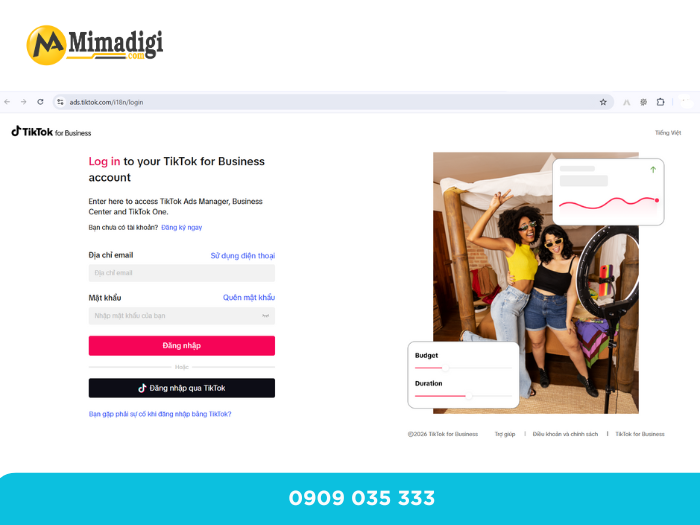
Access TikTok Business Center
First, you need to log in to TikTok Business Center using your primary TikTok account or a linked email. This is the central location for managing all of your business's assets and users.
After successfully logging in, you will see an overview interface displaying accounts, data, and settings related to the Business Center.
Add Members to Business Center
Before inviting members, you should clearly define each person's role and responsibilities (internal staff or agency). Incorrect permission assignment can lead to risks such as wrong modifications, data loss, or impact on business assets.
The steps are as follows:
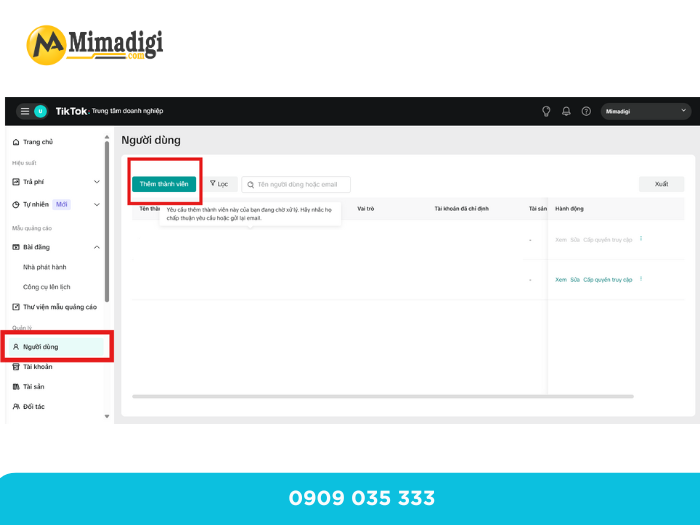
- Access the Settings section and select Members
- Click Invite Member to invite new members
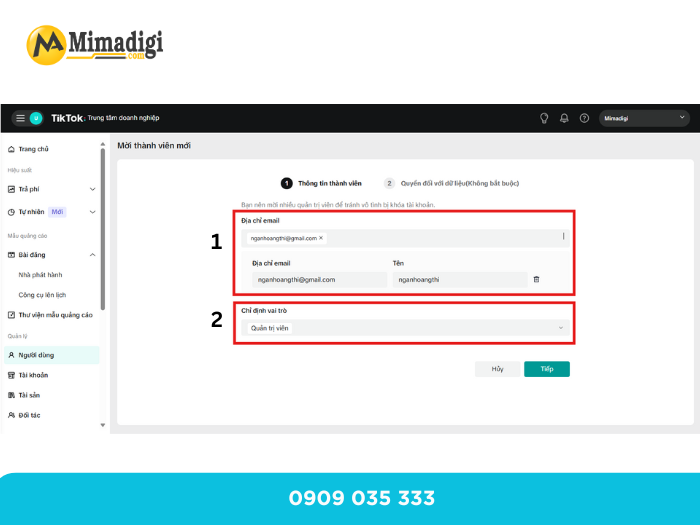
- Enter the email of the employee or agency to whom you want to grant permissions
- Confirm sending the invitation to the Business Center
After sending, the invited person will receive a confirmation email to join.
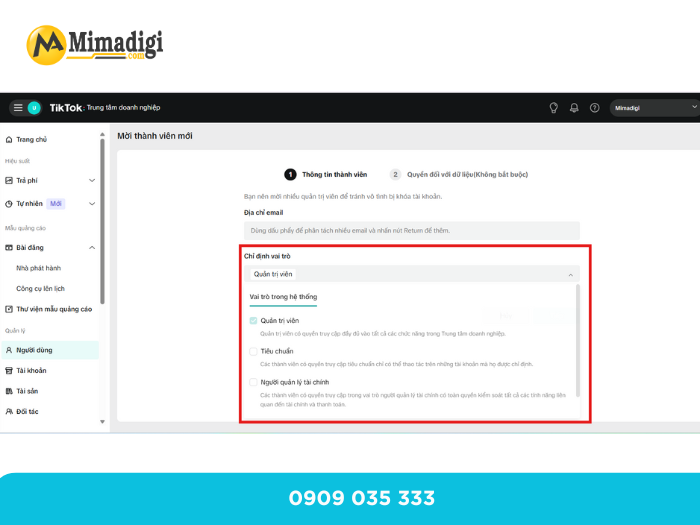
Select the Role to Grant Permissions
Each role in Business Center corresponds to a different level of authority. You should select roles based on actual job functions to ensure system security.
Common roles include:
- Admin: Full authority to manage the Business Center and all related assets
- Operator: Performs operational tasks such as managing campaigns, running ads
- Analyst: Only has permission to view data, reports, and statistics
Limiting permissions to the correct roles helps prevent unauthorized interventions.
Select Permissions for Linked Assets
After selecting a role, you need to specify which assets that member is allowed to access. This is a crucial step to limit the scope of operations and protect business assets.
Assets that can be assigned permissions include:
- TikTok ad accounts
- Pixels
- TikTok pages
- Media library
- Other business assets within the Business Center
You should only grant necessary permissions, avoiding access to all assets if not truly required.
Confirm and Verify Operational Permissions
After the member accepts the invitation via email, you should review the assigned permissions list to ensure:
- The correct role has been selected
- The correct assets are accessible
- No superfluous permissions are granted
Regular checks help ensure the Business Center system always operates stably, securely, and in line with the business's operational model.
Important Notes When Granting TikTok Business Center Permissions
Before granting TikTok account permissions via Business Center, businesses need to understand that this is not just a technical operation but digital asset management. Some important notes below will help you operate more safely and sustainably.
Always Keep Admin Rights for the Business Owner
Admin rights should be retained by the business owner or the highest responsible person. Full administrative control should not be given to employees or external agencies to avoid the risk of losing account control.
- Only grant permissions appropriate to actual duties
- Each member should only be granted permissions corresponding to their job role:
- Ad managers only need ad operation rights
- Report generators only need data viewing rights
- Do not grant more permissions than necessary
Granting excessive permissions can easily lead to accidental modifications, asset deletion, or changes to the system structure.
Clearly Assign Asset Permissions, Avoid Leaving Blank
After inviting members, many businesses forget to assign permissions for specific assets. This leads to:
- Members having permissions but unable to perform actions
- Or conversely, having uncontrolled access rights
- You should thoroughly check each account, Pixel, and media library before finalizing permission assignments.
Periodically Review and Audit Permissions
Businesses should review access permissions periodically (every 3–6 months), especially when:
- Staff resign
- Agencies change
- Advertising campaigns conclude
Auditing helps keep the system tidy, secure, and aligned with the current operational model.
Common Mistakes When Granting TikTok Account Permissions
Many TikTok account incidents stem from seemingly minor mistakes listed below.
- Sharing TikTok account email and password
- This is the most serious mistake. Sharing login information:
- Leads to uncontrollable usage of the account
- Makes it difficult to revoke permissions in case of incidents
- Violates TikTok's security policies
Business Center was created to completely replace this practice.
Granting Admin Rights to External Agencies
Many businesses, for 'convenience,' grant Admin rights to agencies. In case of disputes or termination of cooperation, businesses risk:
- Losing account management rights
- Having advertising assets withheld
- Facing legal difficulties
Agencies should only be granted necessary operational rights, not the highest administrative control.
Not Revoking Permissions When Staff Leave
Staff leaving but still having access is a very common mistake. This poses risks of:
- Unauthorized interference
- Data leakage
- Impact on advertising operations
Businesses must revoke permissions immediately upon contract termination or resignation.
Using a Single Business Center for Multiple Businesses
Combining multiple businesses into one Business Center can easily lead to:
- Asset confusion
- Difficulty in controlling permissions
- Legal risks in case of disputes
Each business should have its own Business Center for independent management.
Not Verifying Permissions After Assignment
Many businesses skip the verification step after inviting members. This can lead to:
- Missing or incorrect permissions
- Failure to timely detect superfluous permissions
- Disruptions in operational processes
Granting TikTok account permissions via TikTok Business Center is a crucial step for businesses to manage digital assets safely, transparently, and efficiently. Understanding the important notes and avoiding common mistakes will help businesses minimize risks, save time, and ensure stable TikTok operations in the long term.
Contact Information
MIMA TRADING AND SERVICE COMPANY LIMITED
Tax Code: 0318672839
Address: Hoc Mon, Ho Chi Minh City
Hotline / Zalo: 0909 035 333
Email: info@mimadigi.com
Website: https://mimadigi.com/











Share your review