
















Gmail Email Whitelisting Guide | MIMADIGI
While using Gmail, emails from clients, partners, or systems can sometimes be mistakenly sent to the Spam folder. This can lead to you missing important information. To prevent this from happening, you should whitelist emails on Gmail so that important emails are always delivered to your inbox.
The article below will guide you through the process of whitelisting emails on Gmail in a detailed and easy-to-follow manner.

What is Email Whitelisting on Gmail?
Email whitelisting involves creating a list of trusted email addresses or domains so that Gmail does not categorize emails from these sources into the Spam folder. After setting up whitelisting, emails from these addresses will be sent directly to your Inbox.
Email whitelisting is commonly used when you need to receive emails from:
-
Clients
-
Partners
-
Website systems
-
Notification emails
-
Invoice emails
-
System emails
-
Company domain emails
How to Whitelist Emails on Gmail
Here are the steps to create a whitelist in Gmail.
Step 1: Log in to Gmail and access Settings
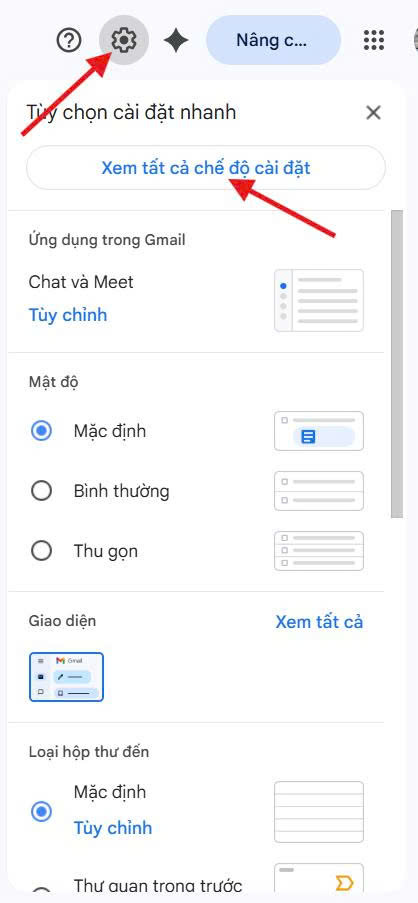
First, log in to your Gmail account. Then, look at the top right corner of the screen, click the gear icon, and select "See all settings" to access the email settings page.
Contact us for further assistance: 0909 035 333
Step 2: Navigate to the Filters section
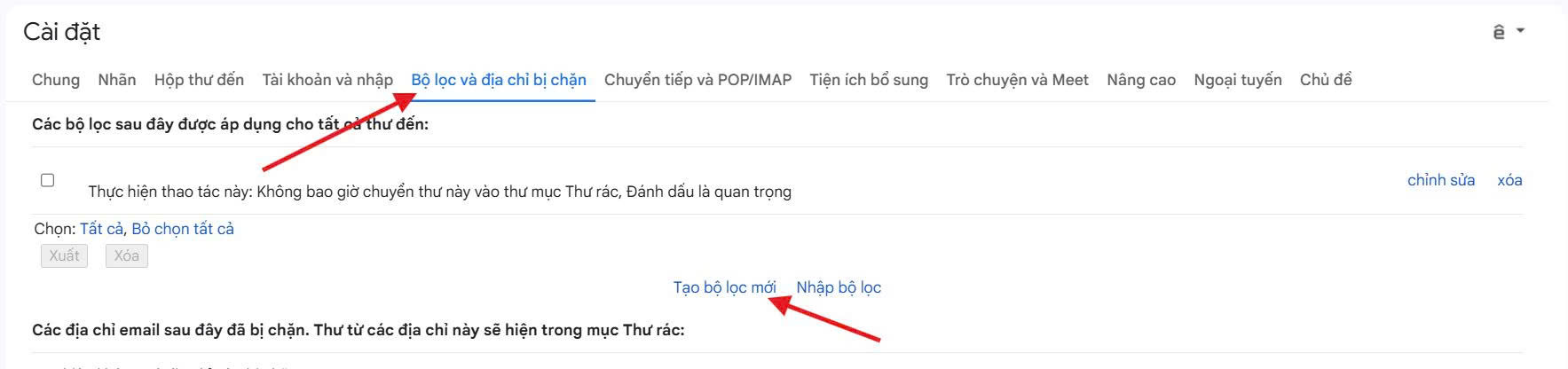
In the settings interface, select the Filters and Blocked Addresses tab. This is where you can create email filtering rules, including whitelisting emails.
Then, click on Create a new filter.
Contact us for further assistance: 0909 035 333
Step 3: Enter the email address or domain to whitelist
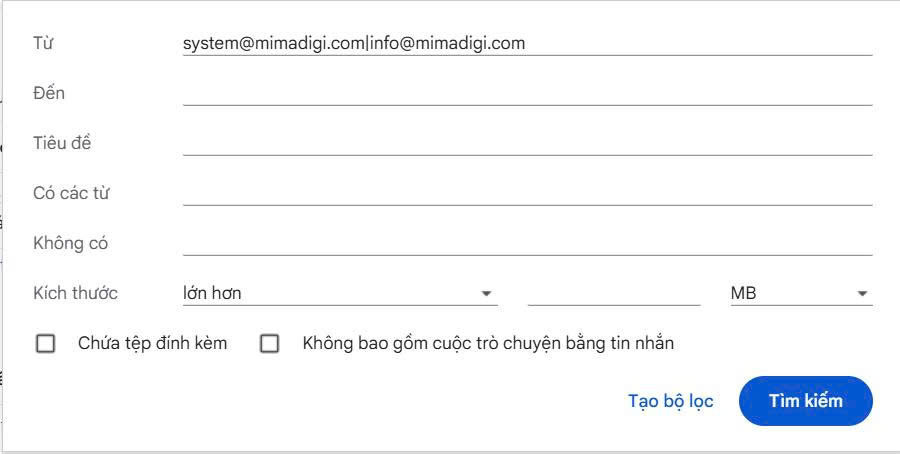
In the filter creation window, enter the email or domain in the From field.
Whitelisting a specific email
Enter the exact email address you want to whitelist.
Example:
info@mimadigi.com
Whitelisting multiple emails
If you want to whitelist multiple different emails, enter them separated by the | symbol.
Example:
info@mimadigi.com
|support@mimadigi.com
|sales@mimadigi.com
Whitelisting by domain
If you want to whitelist all emails from a company or system, simply enter the domain name.
Example:
mimadigi.com
Whitelisting multiple domains
Enter the domains separated by the | symbol.
Example:
mimadigi.com|gmail.com|yahoo.com
After entering, click Create filter.
Contact us for further assistance: 0909 035 333
Step 4: Configure email whitelisting
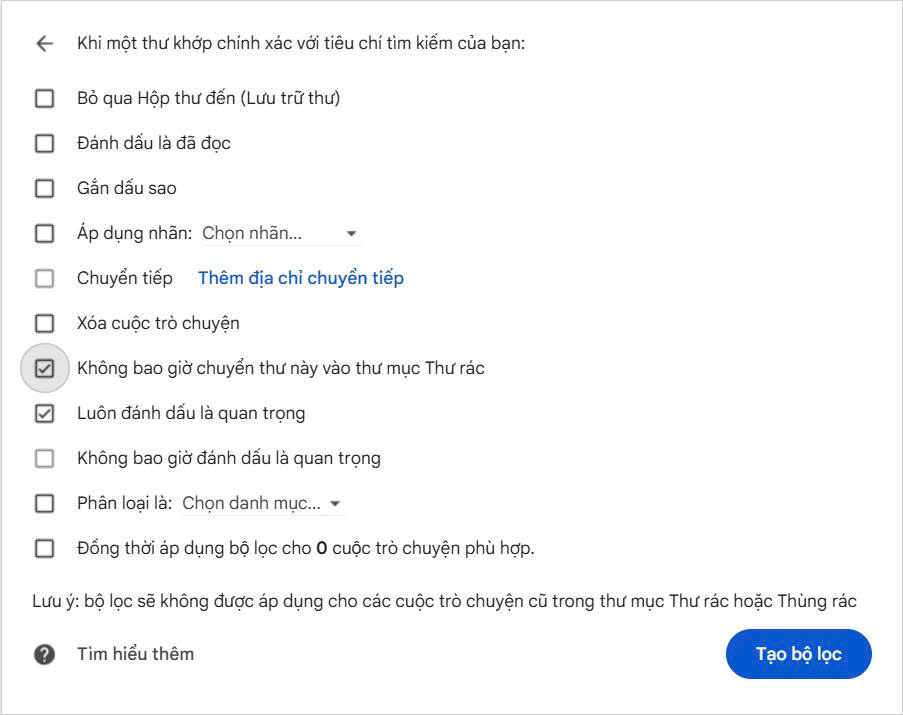
In the next step, check the following options:
-
Never send it to Spam
-
Always mark it as important
Then, click Create filter to complete the email whitelisting process.
Contact us for further assistance: 0909 035 333
Click Create filter to proceed to the Whitelist list.

Contact us for further assistance: 0909 035 333
How to Check if Email Whitelisting is Working
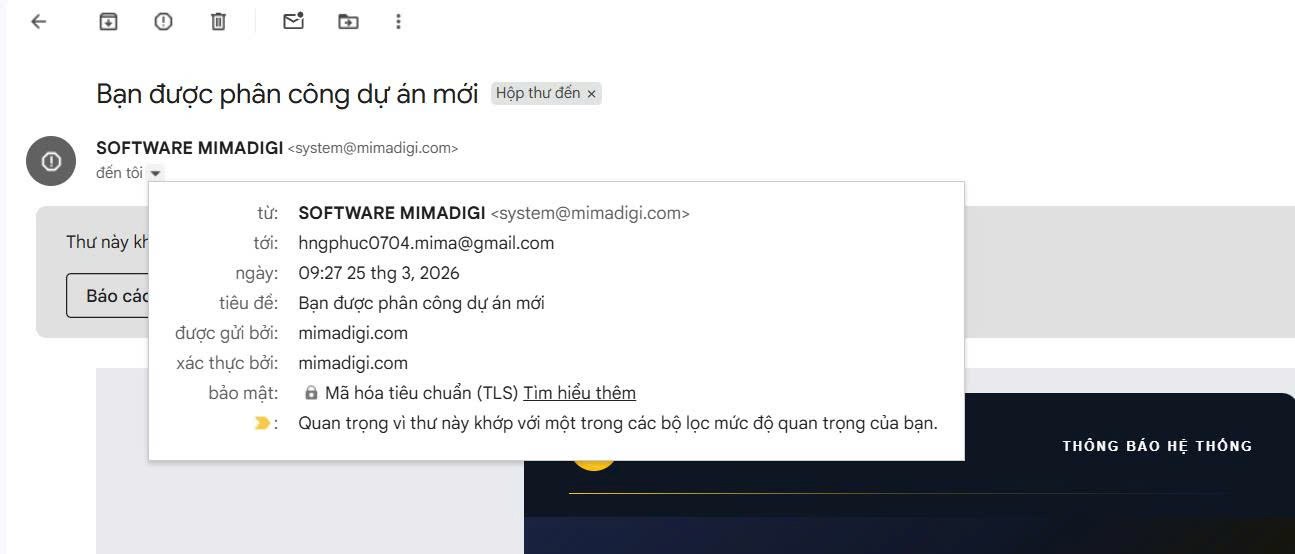
After creating the filter, emails from the whitelisted addresses or domains will automatically go to your Inbox.
You can check this by:
-
Asking someone to send you a test email.
-
Checking if the email arrives in your Inbox.
-
Checking the Spam folder to see if any emails are still mistakenly filtered.
Contact us for further assistance: 0909 035 333
Important Notes When Whitelisting Emails on Gmail
Only Whitelist Trusted Emails
You should only whitelist emails from clients, partners, companies, or systems that you trust to avoid spam.
Consider Whitelisting by Domain
If you work with a company or use a corporate email service, whitelisting by domain is recommended to ensure no emails are missed.
Check Your Spam Folder Regularly
Gmail may occasionally misfilter emails, so it's advisable to check your Spam folder periodically.
Whitelisting emails on Gmail is a simple yet extremely important action. By setting up a filter once, you can ensure that important emails always reach your inbox and are not lost in the Spam folder.
If you are using services from MIMADIGI, whitelist emails now to ensure you don't miss any important notifications from our system.
10 Frequently Asked Questions
1. What is email whitelisting on Gmail?
Answer: Email whitelisting is the process of adding email addresses or domains to a safe list so that Gmail does not send emails from these sources to the Spam folder.
2. Why is it necessary to whitelist emails on Gmail?
Answer: Whitelisting helps ensure that emails from clients, partners, or systems always arrive in the Inbox and are not missed.
3. Can I whitelist multiple emails at once?
Answer: Yes, you can enter multiple emails in the filter and separate them with the | symbol.
4. Can I whitelist by domain?
Answer: Yes, you just need to enter the domain name in the filter to receive all emails from that domain.
5. Does email whitelisting apply on mobile?
Answer: Yes, because whitelisting is configured on your Gmail account, it applies to all devices.
6. Will whitelisted emails still go to Spam?
Answer: Typically, no, if you have set up the filter correctly and the email does not violate spam policies.
7. Can I remove whitelisted emails?
Answer: Yes, you can delete filters in Gmail Settings at any time.
8. Does email whitelisting cost money?
Answer: No, email whitelisting on Gmail is a free feature.
9. When should I whitelist emails?
Answer: You should whitelist when you frequently receive emails from clients, partners, website systems, or corporate email services.
10. Which emails should I whitelist?
Answer: You should whitelist emails from clients, partners, company emails, system emails, and emails from MIMADIGI.
MIMADIGI Contact Information
-
MIMADIGI
-
Address: 31/3B Thoi Tu 1 Hamlet, Dong Thanh Commune, Ho Chi Minh City, Vietnam
-
Phone: 0909 035 333
-
Email: info@mimadigi.com
-
Website: https://mimadigi.com/











Share your review